
Windows · macOS · Linux
Plug in.
Backed up.
Aegis copies your important folders to a USB drive and locks them with a passphrase only you know. If your laptop dies, gets stolen or gets hit by ransomware, plug the drive into any computer and get your files back. If someone steals the drive, they get nothing.
Simulation: back up to a USB drive
Drive not connected
Drag the drive to the port, or press it.
Backups on the drive
- None yet. Plug the drive in.
What a thief sees
A simulation of the flow, in this page. The file names are made up.
How it works
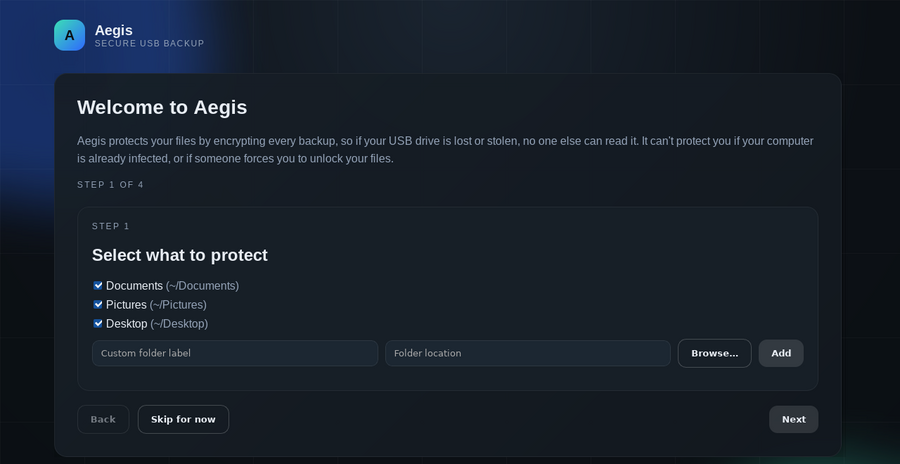
- Pick folders. Documents, Pictures, Desktop, or anything else.
- Pick a passphrase. Write it down. No one, not even Aegis, can recover it.
- Plug in a USB drive. Aegis sets it up without deleting what's already on it.
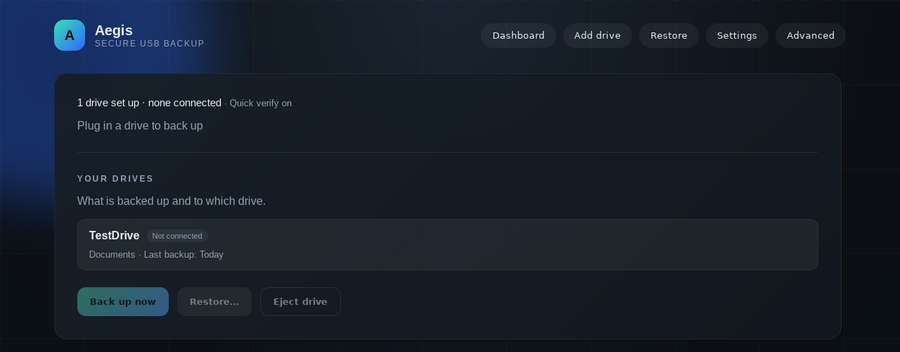
- Done. Next time you plug the drive in, Aegis backs up by itself. Only changed files are copied, so later backups are fast.
Restore: open Aegis → Restore → pick a date → pick a folder. New computer? Install Aegis, plug in the drive, type your passphrase.
What you get
- Strong encryptionEvery backup is encrypted (AES-256) before it touches the drive.
- AutomaticBacks up when you plug in your drive. Runs quietly in the tray or menu bar.
- HistoryKeeps every past version until you choose to clean up. Get back last week's file.
- Get back one fileBrowse any past backup and restore just the files you need. Never overwrites what's already there.
- RemindersNudges you when it's been a week since your last backup. Optional hourly backups while the drive stays plugged in.
- Drive spaceShows free space and warns before your drive fills up.
- Safe to unplugUnplugging mid-backup never damages earlier backups.
- Checks itselfVerifies each backup after it finishes.
- No lock-inBackups use the open restic format. Readable without Aegis.
- PrivateNo accounts, no cloud, no internet. Your passphrase is never saved to disk (optionally kept in your system keychain).
- Every desktopSame app on Windows, macOS and Linux. A drive made on one works on the others (use exFAT).
Lose the drive, not the files
On the drive
This runs your browser's Web Crypto (AES-256-GCM, key from PBKDF2) as an illustration. Aegis adds no crypto of its own: backups are restic repositories (AES-256-CTR + Poly1305, scrypt key derivation).
- Passphrase never written to disk or logs, never passed on a command line. Optional storage in the OS keychain; paranoid mode turns that off.
- Local API listens on
127.0.0.1only and accepts requests only from the Aegis window, which blocks websites from talking to it. - Drives are untrusted. Drive markers hold no secrets and are sanitized when read.
- Restore never overwrites existing files.
- Supply chain: the bundled restic is a pinned release, checked against restic's published SHA-256 checksums at build time.
- Out of scope: malware already running as you, or someone who forces you to reveal your passphrase.
Download
Installers are published on the releases page. Everything Aegis needs is inside the installer.
| Computer | File |
|---|---|
| Windows 10 / 11 | Aegis_…_x64-setup.exe |
| Mac with Apple chip (M1 and newer) | Aegis_…_aarch64.dmg |
| Mac with Intel chip | Aegis_…_x64.dmg |
| Ubuntu / Debian / Mint | Aegis_…_amd64.deb |
| Other Linux | Aegis_…_amd64.AppImage |
First launch shows a warning
Aegis is free and not signed with a paid Apple or Microsoft certificate, so the first launch shows a warning. It's safe to continue.
Windows: "More info" → "Run anyway". Mac: open Aegis once, click "Done", then System Settings → Privacy & Security → scroll down → "Open Anyway". Details
From source
bash scripts/fetch-restic.sh x86_64-unknown-linux-gnu   # bundled restic
cargo run -p aegis-ui                                    # desktop app with embedded agent